
The accountant bottleneck
Anyone on your team can confirm a payment. Nobody has to ask the accountant.
A customer pays by transfer and sends through the slip. Only the people with bank-portal logins can confirm the money actually arrived, so every counter, every delivery and every sales call ends up going through the accountant.
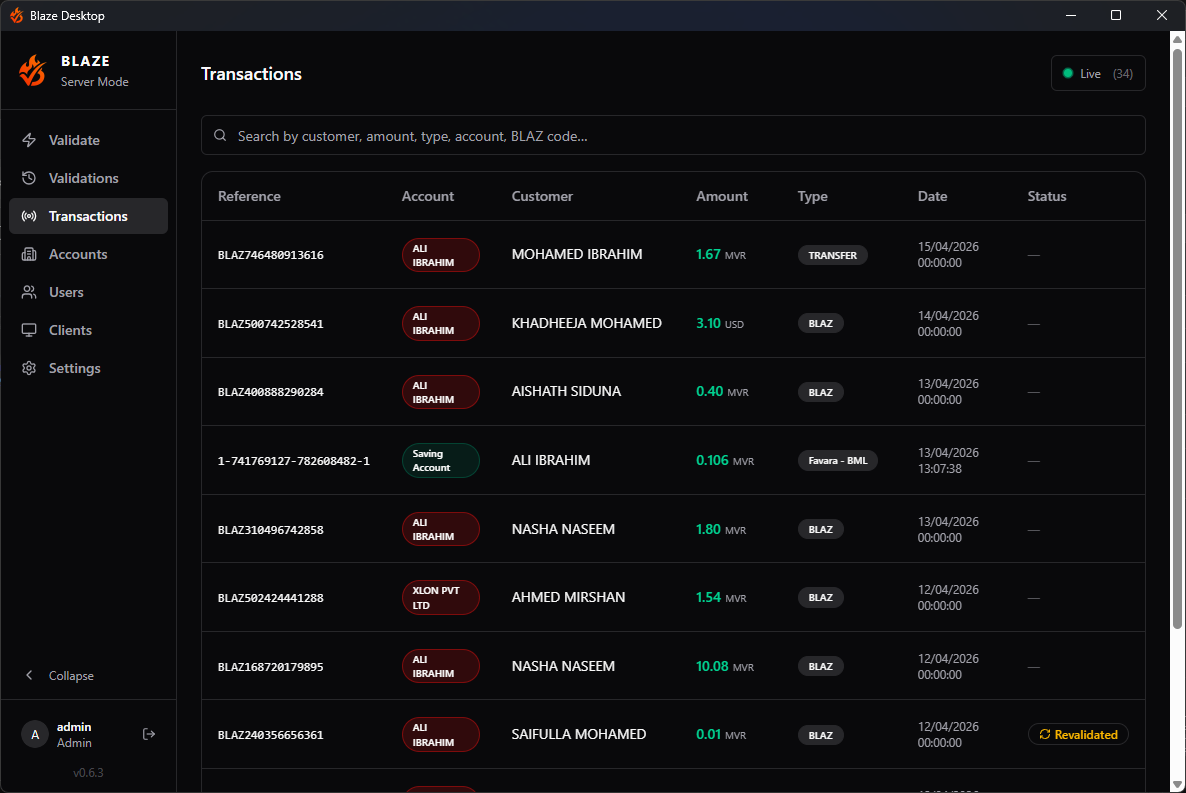
Blaze mirrors your incoming credits onto one machine in your office. Any member of staff can check a slip against real bank data in seconds — from the desktop app, from Telegram, or from the software you already run.
Bank of Maldives, with Maldives Islamic Bank alongside it.
Desktop, Telegram, or straight from your own software.
Access narrowed by role, and by individual bank account.
Of your bank data held on any server of ours. Ever.
In the field
Battle-tested in the most fraud-prone, high-risk trades in the country.
One recurring scam: several buyers hit different outlets at the same moment with the same slip. The first check comes back green. Every one after comes back amber, marked Revalidated, naming who cleared it and when.
| Reference | Account | Name / Acct # | Amount | Type | Date | Status | Validator |
|---|---|---|---|---|---|---|---|
| BLAZ742180936514 | MVR | AHMED IBRAHIM | 3,450.00 MVR | Transfer Credit | Revalidated | counter 2 (Telegram) | |
| BLAZ742180936514 | MVR | AHMED IBRAHIM | 3,450.00 MVR | Transfer Credit | Revalidated | counter 1 | |
| BLAZ742180936514 | MVR | AHMED IBRAHIM | 3,450.00 MVR | Transfer Credit | Validated | admin |
Why Blaze is different
Every other option asks you to hand your bank data to somebody else's server. We do not even keep a copy.
Your transactions live in an encrypted database on your own hardware. No cloud mirror, no nightly upload, no shared tenancy. If our servers went down, your records would not move.
Most of the time we are not in the path at all. Your staff's app and your machine connect directly, over any internet connection — no LAN, no VPN, no ports to open. What does pass through us is sealed, and only your machine holds the key.
The only thing that leaves your network is the slip image, read by our text recogniser to pull out the reference. No credentials, no access to any account.
Under the hood
AES-256-GCM on everything that leaves the machine. The local database is encrypted at rest and keyed to the machine it runs on. Backups are separately encrypted with a passphrase of your choosing. Bank credentials are never transmitted, and there is no cloud account to create.
Three ways in, one set of records.
Whoever is checking, whatever they are checking from, the answer comes off the same machine in your office — and lands in the same history.
01
The desktop app
The full workstation: slip in, answer out, with account management, roles and the searchable history behind it. Installs on Windows and keeps working whether or not anyone is logged in.
02
Telegram
Forward the slip to the bot. The reply lands in the chat under that name, so whoever is on the counter can check without a workstation. New credits are announced there too.
03
Your own software
Your point of sale or billing system can run the same check over a keyed interface, tied to the accounts you choose.
Drop screenshot here, click to browse, or paste from clipboard
Parses BML and MIB transfer slips via OCR
SEARCH
- BLAZ000000000001 — BLAZ code
- 1500 — latest 10 inter-bank
- !1500 — same, with intra-bank
- Reference
- BLAZ518402337196
- Name / Acct #
- IBRAHIM MOOSA
- Amount
- + MVR 12,600.00
- Date
- 11/08/2026 18:41:12
What it does, in detail.
01
Matched on something a forger cannot know
Blaze checks the reference the bank stamps on the receiving side. The sender never sees it, so an edited slip fails.
02
Fussy about the small things
Drag the slip straight out of Viber, or paste it from WhatsApp. No saving files first. Typing a reference or an amount works too.
03
Every transfer type, labelled
Transfers, Favara instant payments, RTGS, ACH, ATM and card credits, each named rather than left as a code.
04
Many accounts, one place
Accounts across both banks, in MVR or USD, each named so staff know which one was paid.
05
Roles, down to the account
Four roles — admin, accountant, overseer, validator — and permission can be narrowed to individual bank accounts.
06
Nothing gets cleared twice quietly
Every check is recorded against the person who made it. A reference cleared once before comes back marked, naming who cleared it and when.
07
Search that goes back through all of it
Name, amount, type, reference or validator, narrowed by date — the whole history, not just what fits on screen. Export what you searched.
08
Told as the money lands
New credits are announced in Telegram to the people who asked for them, so nobody sits refreshing a screen.
09
Installs once, then gets on with it
Blaze runs as a Windows service, through reboots and with nobody logged in. It updates itself.
Under active development
Blaze is not a finished product sitting on a shelf. Bank coverage, features and rough edges are worked on continuously, and what customers ask for is what gets built next.
Support, locally
Built and supported by people with deep roots in Maldivian business. We know the local banking workflows, and how your counter staff actually work day to day.
Bank coverage
Bank of Maldives is fully supported. Maldives Islamic Bank is supported but still experimental while we finish hardening it.
See it on your own accounts
Ask for a demo, and let your counter staff try the check themselves.
We will set it up against one of your own bank accounts, so the answer you are looking at is your own money. Bring the accountant — they will have the sharpest questions.